Automatización e inteligencia artificial
Collections
Recaudo reminds your late customers by WhatsApp, email or phone call, following the phases and hours you set, and records every payment promise.
Before you start
How overdue accounts come in
Collections works on the installments of your invoices whose due date has passed. Invoices can come in several ways:
- Creating them manually in Collect › Sales › Invoices.
- Through the Recaudo API, from your own system.
- Uploading a CSV file in Settings › Imports.
- Syncing your ERP in Settings › ERP.
Set up automatic collections
You decide which channel to use depending on days overdue, and during which hours your customers can be contacted.
-
Open the settings
Go to Collections › Settings and, on the Automation tab, turn on Automatic collections. -
Create the phases
Under Collection phases use Add phase or Load recommended settings. Each phase runs From day to To day (a negative number is before the due date) and sets how many messages and calls per day and which Active channels it uses: email, WhatsApp, AI call or scripted call. -
Set the schedule
Under Sending hours choose the start time, end time and Allowed days. Recaudo does not contact anyone outside those hours or on unchecked days. -
Choose templates and channels
On the Channels tab pick the WhatsApp templates for each kind of reminder and how to group messages (by installment, by invoice or by customer). -
Set limits
Under Limits set a monthly budget and, if you allow it, how much of the late fees AI agents can waive.
Collect manually from Overdue
Besides automatic collections, you can act on a single account or on many at once.
-
Open Overdue
Go to Collections › Overdue. At the top you see overdue invoices, overdue installments, overdue amount and late-fee interest. -
Filter
Use Aging (0 to 30, 31 to 60, 61 to 90 or over 90 days) and sort by due date, amount or customer. -
Reach out
On each row you can Send email, Send WhatsApp, Call with AI or Record payment promise. For several customers use Bulk email or Bulk WhatsApp. -
Export
Use Export CSV to work your portfolio outside Recaudo.
Record payment promises
When a customer commits to paying on a date, record it. While the promise is active, no collection messages are sent to them that day.
-
Create the promise
In Collections › Promises click New promise and fill in customer, invoice (optional), date, promised amount and notes. AI agents also record promises on their own. -
Follow up
When the date arrives, mark the promise as kept, record a partial payment or mark it as broken.
Charge late fees
Late fees are set up outside the collections module, in Settings › Late fees.
-
Create a policy
Click New policy and choose the type: periodic percentage, compound interest, one-time percentage or fixed amount. -
Set the rate and limits
Enter the rate, its period, the Grace days and, optionally, a minimum charge, maximum charge or a cap as a percentage of the amount. -
Make it the default
Check Use as default policy so it applies to your invoices. Recaudo calculates late fees every day.
Important
Measure results
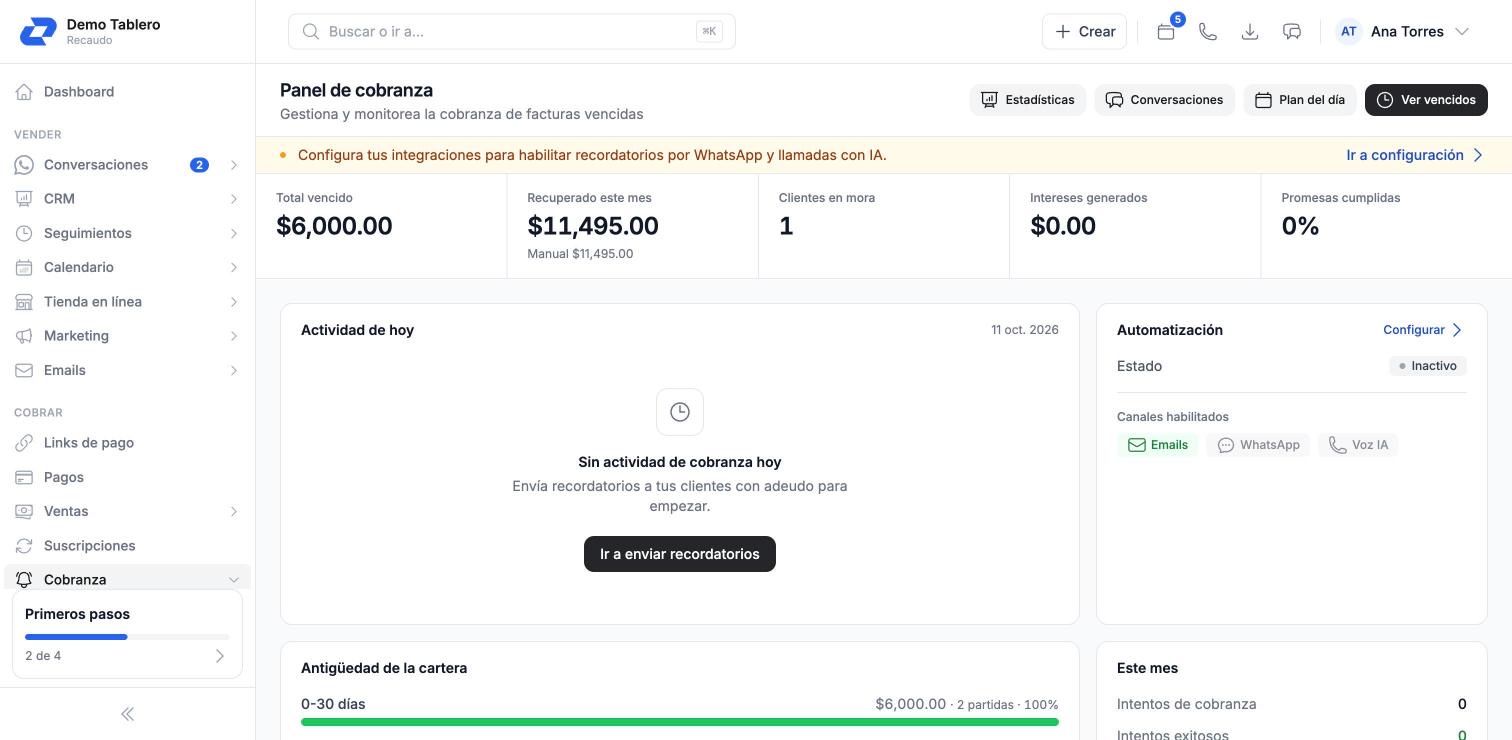
In Collections › Dashboard you see the total overdue, what was recovered this month and portfolio aging. Statistics has the collections funnel, performance by channel and amounts collected by source and by agent. Attempts shows every contact made, through which channel and with what result.
Tip